4.
在 Windows 使用 Python

This document aims to give an overview of Windows-specific behaviour you should know about when using Python on Microsoft Windows.
Unlike most Unix systems and services, Windows does not include a system supported installation of Python. To make Python available, the CPython team has compiled Windows installers with every
release
for many years. These installers are primarily intended to add a per-user installation of Python, with the core interpreter and library being used by a single user. The installer is also able to install for all users of a single machine, and a separate ZIP file is available for application-local distributions.
As specified in
PEP 11
, a Python release only supports a Windows platform while Microsoft considers the platform under extended support. This means that Python 3.13 supports Windows 8.1 and newer. If you require Windows 7 support, please install Python 3.8.
There are a number of different installers available for Windows, each with certain benefits and downsides.
完整安装程序
contains all components and is the best option for developers using Python for any kind of project.
The Microsoft Store package
is a simple installation of Python that is suitable for running scripts and packages, and using IDLE or other development environments. It requires Windows 10 and above, but can be safely installed without corrupting other programs. It also provides many convenient commands for launching Python and its tools.
nuget.org 包
are lightweight installations intended for continuous integration systems. It can be used to build Python packages or run scripts, but is not updateable and has no user interface tools.
可嵌入包
is a minimal package of Python suitable for embedding into a larger application.
4.1.
完整安装程序

4.1.1.
安装步骤

Four Python 3.13 installers are available for download - two each for the 32-bit and 64-bit versions of the interpreter. The
web installer
is a small initial download, and it will automatically download the required components as necessary. The
离线安装程序
includes the components necessary for a default installation and only requires an internet connection for optional features. See
安装无需下载
for other ways to avoid downloading during installation.
After starting the installer, one of two options may be selected:
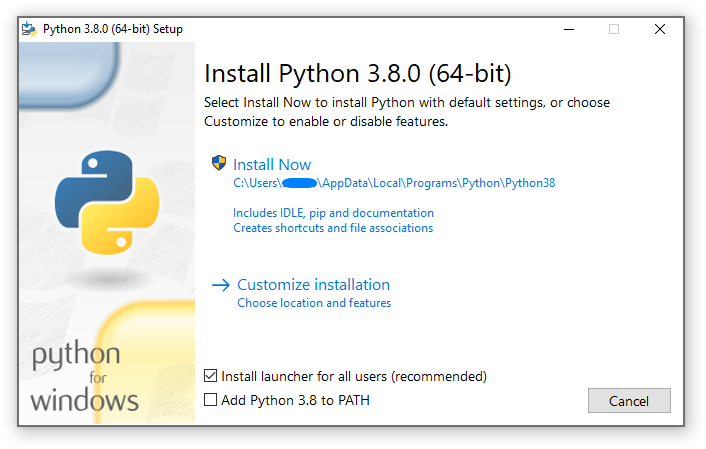
If you select “Install Now”:
-
You will
not
need to be an administrator (unless a system update for the C Runtime Library is required or you install the
用于 Windows 的 Python 启动器
for all users)
-
Python will be installed into your user directory
-
The
用于 Windows 的 Python 启动器
will be installed according to the option at the bottom of the first page
-
The standard library, test suite, launcher and pip will be installed
-
If selected, the install directory will be added to your
PATH
-
Shortcuts will only be visible for the current user
Selecting “Customize installation” will allow you to select the features to install, the installation location and other options or post-install actions. To install debugging symbols or binaries, you will need to use this option.
To perform an all-users installation, you should select “Customize installation”. In this case:
-
You may be required to provide administrative credentials or approval
-
Python will be installed into the Program Files directory
-
The
用于 Windows 的 Python 启动器
will be installed into the Windows directory
-
Optional features may be selected during installation
-
The standard library can be pre-compiled to bytecode
-
If selected, the install directory will be added to the system
PATH
-
Shortcuts are available for all users
4.1.2.
移除 MAX_PATH 限制

Windows historically has limited path lengths to 260 characters. This meant that paths longer than this would not resolve and errors would result.
In the latest versions of Windows, this limitation can be expanded to approximately 32,000 characters. Your administrator will need to activate the “Enable Win32 long paths” group policy, or set
LongPathsEnabled
to
1
in the registry key
HKEY_LOCAL_MACHINE\SYSTEM\CurrentControlSet\Control\FileSystem
.
This allows the
open()
函数,
os
module and most other path functionality to accept and return paths longer than 260 characters.
After changing the above option, no further configuration is required.
3.6 版改变:
Support for long paths was enabled in Python.
4.1.3.
安装无需 UI

All of the options available in the installer UI can also be specified from the command line, allowing scripted installers to replicate an installation on many machines without user interaction. These options may also be set without suppressing the UI in order to change some of the defaults.
The following options (found by executing the installer with
/?
) can be passed into the installer:
|
名称
|
描述
|
|
/passive
|
to display progress without requiring user interaction
|
|
/quiet
|
to install/uninstall without displaying any UI
|
|
/simple
|
to prevent user customization
|
|
/uninstall
|
to remove Python (without confirmation)
|
|
/layout [directory]
|
to pre-download all components
|
|
/log [filename]
|
to specify log files location
|
All other options are passed as
name=value
, where the value is usually
0
to disable a feature,
1
to enable a feature, or a path. The full list of available options is shown below.
|
名称
|
描述
|
默认
|
|
InstallAllUsers
|
Perform a system-wide installation.
|
0
|
|
TargetDir
|
The installation directory
|
Selected based on InstallAllUsers
|
|
DefaultAllUsersTargetDir
|
The default installation directory for all-user installs
|
%ProgramFiles%\Python X.Y
or
%ProgramFiles(x86)%\Python X.Y
|
|
DefaultJustForMeTargetDir
|
The default install directory for just-for-me installs
|
%LocalAppData%\Programs\Python\PythonXY
or
%LocalAppData%\Programs\Python\PythonXY-32
or
%LocalAppData%\Programs\Python\PythonXY-64
|
|
DefaultCustomTargetDir
|
The default custom install directory displayed in the UI
|
(empty)
|
|
AssociateFiles
|
Create file associations if the launcher is also installed.
|
1
|
|
CompileAll
|
Compile all
.py
files to
.pyc
.
|
0
|
|
PrependPath
|
Prepend install and Scripts directories to
PATH
and add
.PY
to
PATHEXT
|
0
|
|
AppendPath
|
Append install and Scripts directories to
PATH
and add
.PY
to
PATHEXT
|
0
|
|
Shortcuts
|
Create shortcuts for the interpreter, documentation and IDLE if installed.
|
1
|
|
Include_doc
|
Install Python manual
|
1
|
|
Include_debug
|
Install debug binaries
|
0
|
|
Include_dev
|
Install developer headers and libraries. Omitting this may lead to an unusable installation.
|
1
|
|
Include_exe
|
安装
python.exe
and related files. Omitting this may lead to an unusable installation.
|
1
|
|
Include_launcher
|
安装
用于 Windows 的 Python 启动器
.
|
1
|
|
InstallLauncherAllUsers
|
Installs the launcher for all users. Also requires
Include_launcher
to be set to 1
|
1
|
|
Include_lib
|
Install standard library and extension modules. Omitting this may lead to an unusable installation.
|
1
|
|
Include_pip
|
Install bundled pip and setuptools
|
1
|
|
Include_symbols
|
Install debugging symbols (
*.pdb
)
|
0
|
|
Include_tcltk
|
Install Tcl/Tk support and IDLE
|
1
|
|
Include_test
|
Install standard library test suite
|
1
|
|
Include_tools
|
Install utility scripts
|
1
|
|
LauncherOnly
|
Only installs the launcher. This will override most other options.
|
0
|
|
SimpleInstall
|
Disable most install UI
|
0
|
|
SimpleInstallDescription
|
A custom message to display when the simplified install UI is used.
|
(empty)
|
For example, to silently install a default, system-wide Python installation, you could use the following command (from an elevated command prompt):
python-3.9.0.exe /quiet InstallAllUsers=1 PrependPath=1 Include_test=0
To allow users to easily install a personal copy of Python without the test suite, you could provide a shortcut with the following command. This will display a simplified initial page and disallow customization:
python-3.9.0.exe InstallAllUsers=0 Include_launcher=0 Include_test=0
    SimpleInstall=1 SimpleInstallDescription="Just for me, no test suite."
(Note that omitting the launcher also omits file associations, and is only recommended for per-user installs when there is also a system-wide installation that included the launcher.)
The options listed above can also be provided in a file named
unattend.xml
alongside the executable. This file specifies a list of options and values. When a value is provided as an attribute, it will be converted to a number if possible. Values provided as element text are always left as strings. This example file sets the same options as the previous example:
<Options>
    <Option Name="InstallAllUsers" Value="no" />
    <Option Name="Include_launcher" Value="0" />
    <Option Name="Include_test" Value="no" />
    <Option Name="SimpleInstall" Value="yes" />
    <Option Name="SimpleInstallDescription">Just for me, no test suite</Option>
</Options>
4.1.4.
安装无需下载

As some features of Python are not included in the initial installer download, selecting those features may require an internet connection. To avoid this need, all possible components may be downloaded on-demand to create a complete
layout
that will no longer require an internet connection regardless of the selected features. Note that this download may be bigger than required, but where a large number of installations are going to be performed it is very useful to have a locally cached copy.
Execute the following command from Command Prompt to download all possible required files. Remember to substitute
python-3.9.0.exe
for the actual name of your installer, and to create layouts in their own directories to avoid collisions between files with the same name.
python-3.9.0.exe /layout [optional target directory]
You may also specify the
/quiet
option to hide the progress display.
4.1.5.
Modifying an install

Once Python has been installed, you can add or remove features through the Programs and Features tool that is part of Windows. Select the Python entry and choose “Uninstall/Change” to open the installer in maintenance mode.
“Modify” allows you to add or remove features by modifying the checkboxes - unchanged checkboxes will not install or remove anything. Some options cannot be changed in this mode, such as the install directory; to modify these, you will need to remove and then reinstall Python completely.
“Repair” will verify all the files that should be installed using the current settings and replace any that have been removed or modified.
“Uninstall” will remove Python entirely, with the exception of the
用于 Windows 的 Python 启动器
, which has its own entry in Programs and Features.
4.1.6.
Installing Free-threaded Binaries

Added in version 3.13:
(Experimental)
注意
Everything described in this section is considered experimental, and should be expected to change in future releases.
To install pre-built binaries with free-threading enabled (see
PEP 703
), you should select “Customize installation”. The second page of options includes the “Download free-threaded binaries” checkbox.
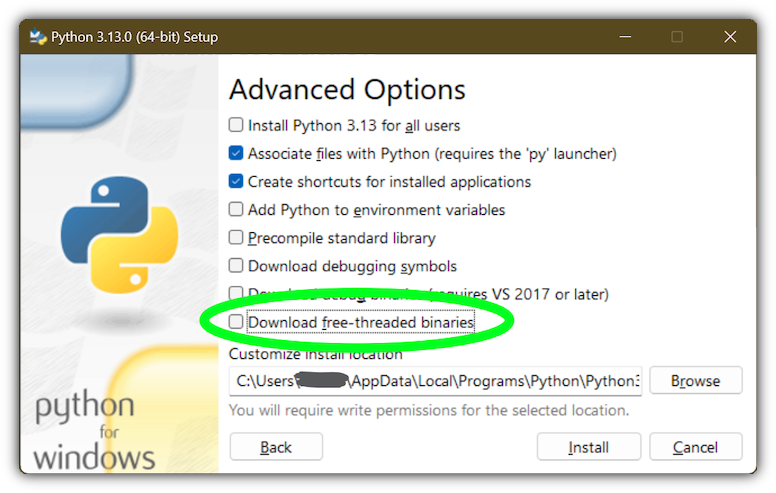
Selecting this option will download and install additional binaries to the same location as the main Python install. The main executable is called
python3.13t.exe
, and other binaries either receive a
t
suffix or a full ABI suffix. Python source files and bundled third-party dependencies are shared with the main install.
The free-threaded version is registered as a regular Python install with the tag
3.13t
(with a
-32
or
-arm64
suffix as normal for those platforms). This allows tools to discover it, and for the
用于 Windows 的 Python 启动器
to support
py.exe -3.13t
. Note that the launcher will interpret
py.exe -3
(or a
python3
shebang) as “the latest 3.x install”, which will prefer the free-threaded binaries over the regular ones, while
py.exe -3.13
will not. If you use the short style of option, you may prefer to not install the free-threaded binaries at this time.
To specify the install option at the command line, use
Include_freethreaded=1
。见
安装无需下载
for instructions on pre-emptively downloading the additional binaries for offline install. The options to include debug symbols and binaries also apply to the free-threaded builds.
Free-threaded binaries are also available
on nuget.org
.
4.2.
The Microsoft Store package

Added in version 3.7.2.
The Microsoft Store package is an easily installable Python interpreter that is intended mainly for interactive use, for example, by students.
To install the package, ensure you have the latest Windows 10 updates and search the Microsoft Store app for “Python 3.13”. Ensure that the app you select is published by the Python Software Foundation, and install it.
警告
Python will always be available for free on the Microsoft Store. If you are asked to pay for it, you have not selected the correct package.
After installation, Python may be launched by finding it in Start. Alternatively, it will be available from any Command Prompt or PowerShell session by typing
python
. Further, pip and IDLE may be used by typing
pip
or
idle
. IDLE can also be found in Start.
All three commands are also available with version number suffixes, for example, as
python3.exe
and
python3.x.exe
及
python.exe
(在哪里
3.x
is the specific version you want to launch, such as 3.13). Open “Manage App Execution Aliases” through Start to select which version of Python is associated with each command. It is recommended to make sure that
pip
and
idle
are consistent with whichever version of
python
被选中。
Virtual environments can be created with
python -m venv
and activated and used as normal.
If you have installed another version of Python and added it to your
PATH
variable, it will be available as
python.exe
rather than the one from the Microsoft Store. To access the new installation, use
python3.exe
or
python3.x.exe
.
The
py.exe
launcher will detect this Python installation, but will prefer installations from the traditional installer.
To remove Python, open Settings and use Apps and Features, or else find Python in Start and right-click to select Uninstall. Uninstalling will remove all packages you installed directly into this Python installation, but will not remove any virtual environments
4.2.1.
已知问题

4.2.1.1.
Redirection of local data, registry, and temporary paths

Because of restrictions on Microsoft Store apps, Python scripts may not have full write access to shared locations such as
TEMP
and the registry. Instead, it will write to a private copy. If your scripts must modify the shared locations, you will need to install the full installer.
At runtime, Python will use a private copy of well-known Windows folders and the registry. For example, if the environment variable
%APPDATA%
is
c:\Users\<user>\AppData\
, then when writing to
C:\Users\<user>\AppData\Local
will write to
C:\Users\<user>\AppData\Local\Packages\PythonSoftwareFoundation.Python.3.8_qbz5n2kfra8p0\LocalCache\Local\
.
When reading files, Windows will return the file from the private folder, or if that does not exist, the real Windows directory. For example reading
C:\Windows\System32
returns the contents of
C:\Windows\System32
plus the contents of
C:\Program Files\WindowsApps\package_name\VFS\SystemX86
.
You can find the real path of any existing file using
os.path.realpath()
:
>>> import os
>>> test_file = 'C:\\Users\\example\\AppData\\Local\\test.txt'
>>> os.path.realpath(test_file)
'C:\\Users\\example\\AppData\\Local\\Packages\\PythonSoftwareFoundation.Python.3.8_qbz5n2kfra8p0\\LocalCache\\Local\\test.txt'
When writing to the Windows Registry, the following behaviors exist:
-
Reading from
HKLM\\Software
is allowed and results are merged with the
registry.dat
file in the package.
-
Writing to
HKLM\\Software
is not allowed if the corresponding key/value exists, i.e. modifying existing keys.
-
Writing to
HKLM\\Software
is allowed as long as a corresponding key/value does not exist in the package and the user has the correct access permissions.
For more detail on the technical basis for these limitations, please consult Microsoft’s documentation on packaged full-trust apps, currently available at
docs.microsoft.com/en-us/windows/msix/desktop/desktop-to-uwp-behind-the-scenes
4.3.
nuget.org 包

Added in version 3.5.2.
The nuget.org package is a reduced size Python environment intended for use on continuous integration and build systems that do not have a system-wide install of Python. While nuget is “the package manager for .NET”, it also works perfectly fine for packages containing build-time tools.
拜访
nuget.org
for the most up-to-date information on using nuget. What follows is a summary that is sufficient for Python developers.
The
nuget.exe
command line tool may be downloaded directly from
https://aka.ms/nugetclidl
, for example, using curl or PowerShell. With the tool, the latest version of Python for 64-bit or 32-bit machines is installed using:
nuget.exe install python -ExcludeVersion -OutputDirectory .
nuget.exe install pythonx86 -ExcludeVersion -OutputDirectory .
To select a particular version, add a
-Version 3.x.y
. The output directory may be changed from
.
, and the package will be installed into a subdirectory. By default, the subdirectory is named the same as the package, and without the
-ExcludeVersion
option this name will include the specific version installed. Inside the subdirectory is a
tools
directory that contains the Python installation:
# Without -ExcludeVersion
> .\python.3.5.2\tools\python.exe -V
Python 3.5.2
# With -ExcludeVersion
> .\python\tools\python.exe -V
Python 3.5.2
In general, nuget packages are not upgradeable, and newer versions should be installed side-by-side and referenced using the full path. Alternatively, delete the package directory manually and install it again. Many CI systems will do this automatically if they do not preserve files between builds.
Alongside the
tools
directory is a
build\native
directory. This contains a MSBuild properties file
python.props
that can be used in a C++ project to reference the Python install. Including the settings will automatically use the headers and import libraries in your build.
The package information pages on nuget.org are
www.nuget.org/packages/python
for the 64-bit version,
www.nuget.org/packages/pythonx86
for the 32-bit version, and
www.nuget.org/packages/pythonarm64
for the ARM64 version
4.3.1.
Free-threaded packages

Added in version 3.13:
(Experimental)
注意
Everything described in this section is considered experimental, and should be expected to change in future releases.
Packages containing free-threaded binaries are named
python-freethreaded
for the 64-bit version,
pythonx86-freethreaded
for the 32-bit version, and
pythonarm64-freethreaded
for the ARM64 version. These packages contain both the
python3.13t.exe
and
python.exe
entry points, both of which run free threaded.
4.4.
可嵌入包

Added in version 3.5.
The embedded distribution is a ZIP file containing a minimal Python environment. It is intended for acting as part of another application, rather than being directly accessed by end-users.
When extracted, the embedded distribution is (almost) fully isolated from the user’s system, including environment variables, system registry settings, and installed packages. The standard library is included as pre-compiled and optimized
.pyc
files in a ZIP, and
python3.dll
,
python37.dll
,
python.exe
and
pythonw.exe
are all provided. Tcl/tk (including all dependents, such as Idle), pip and the Python documentation are not included.
注意
The embedded distribution does not include the
Microsoft C Runtime
and it is the responsibility of the application installer to provide this. The runtime may have already been installed on a user’s system previously or automatically via Windows Update, and can be detected by finding
ucrtbase.dll
in the system directory.
Third-party packages should be installed by the application installer alongside the embedded distribution. Using pip to manage dependencies as for a regular Python installation is not supported with this distribution, though with some care it may be possible to include and use pip for automatic updates. In general, third-party packages should be treated as part of the application (“vendoring”) so that the developer can ensure compatibility with newer versions before providing updates to users.
The two recommended use cases for this distribution are described below.
4.4.1.
Python 应用程序

An application written in Python does not necessarily require users to be aware of that fact. The embedded distribution may be used in this case to include a private version of Python in an install package. Depending on how transparent it should be (or conversely, how professional it should appear), there are two options.
Using a specialized executable as a launcher requires some coding, but provides the most transparent experience for users. With a customized launcher, there are no obvious indications that the program is running on Python: icons can be customized, company and version information can be specified, and file associations behave properly. In most cases, a custom launcher should simply be able to call
Py_Main
with a hard-coded command line.
The simpler approach is to provide a batch file or generated shortcut that directly calls the
python.exe
or
pythonw.exe
with the required command-line arguments. In this case, the application will appear to be Python and not its actual name, and users may have trouble distinguishing it from other running Python processes or file associations.
With the latter approach, packages should be installed as directories alongside the Python executable to ensure they are available on the path. With the specialized launcher, packages can be located in other locations as there is an opportunity to specify the search path before launching the application.
4.4.2.
嵌入 Python

Applications written in native code often require some form of scripting language, and the embedded Python distribution can be used for this purpose. In general, the majority of the application is in native code, and some part will either invoke
python.exe
or directly use
python3.dll
. For either case, extracting the embedded distribution to a subdirectory of the application installation is sufficient to provide a loadable Python interpreter.
As with the application use, packages can be installed to any location as there is an opportunity to specify search paths before initializing the interpreter. Otherwise, there is no fundamental differences between using the embedded distribution and a regular installation.
4.5.
替代捆绑

Besides the standard CPython distribution, there are modified packages including additional functionality. The following is a list of popular versions and their key features:
-
ActivePython
-
Installer with multi-platform compatibility, documentation, PyWin32
-
Anaconda
-
Popular scientific modules (such as numpy, scipy and pandas) and the
conda
package manager.
-
Enthought Deployment Manager
-
“The Next Generation Python Environment and Package Manager”.
Previously Enthought provided Canopy, but it
reached end of life in 2016
.
-
WinPython
-
Windows-specific distribution with prebuilt scientific packages and tools for building packages.
Note that these packages may not include the latest versions of Python or other libraries, and are not maintained or supported by the core Python team.
4.6.
配置 Python

To run Python conveniently from a command prompt, you might consider changing some default environment variables in Windows. While the installer provides an option to configure the PATH and PATHEXT variables for you, this is only reliable for a single, system-wide installation. If you regularly use multiple versions of Python, consider using the
用于 Windows 的 Python 启动器
.
4.6.1.
附录:设置环境变量

Windows allows environment variables to be configured permanently at both the User level and the System level, or temporarily in a command prompt.
To temporarily set environment variables, open Command Prompt and use the
set
命令:
C:\>set PATH=C:\Program Files\Python 3.9;%PATH%
C:\>set PYTHONPATH=%PYTHONPATH%;C:\My_python_lib
C:\>python
These changes will apply to any further commands executed in that console, and will be inherited by any applications started from the console.
Including the variable name within percent signs will expand to the existing value, allowing you to add your new value at either the start or the end. Modifying
PATH
by adding the directory containing
python.exe
to the start is a common way to ensure the correct version of Python is launched.
To permanently modify the default environment variables, click Start and search for ‘edit environment variables’, or open System properties,
Advanced system settings
and click the
环境变量
button. In this dialog, you can add or modify User and System variables. To change System variables, you need non-restricted access to your machine (i.e. Administrator rights).
注意
Windows will concatenate User variables
after
System variables, which may cause unexpected results when modifying
PATH
.
The
PYTHONPATH
variable is used by all versions of Python, so you should not permanently configure it unless the listed paths only include code that is compatible with all of your installed Python versions.
4.6.2.
Finding the Python executable

3.5 版改变。
Besides using the automatically created start menu entry for the Python interpreter, you might want to start Python in the command prompt. The installer has an option to set that up for you.
On the first page of the installer, an option labelled “Add Python to PATH” may be selected to have the installer add the install location into the
PATH
. The location of the
Scripts\
folder is also added. This allows you to type
python
to run the interpreter, and
pip
for the package installer. Thus, you can also execute your scripts with command line options, see
命令行
文档编制。
If you don’t enable this option at install time, you can always re-run the installer, select Modify, and enable it. Alternatively, you can manually modify the
PATH
using the directions in
附录:设置环境变量
. You need to set your
PATH
environment variable to include the directory of your Python installation, delimited by a semicolon from other entries. An example variable could look like this (assuming the first two entries already existed):
C:\WINDOWS\system32;C:\WINDOWS;C:\Program Files\Python 3.9
4.7.
UTF-8 模式

3.7 版添加。
Windows still uses legacy encodings for the system encoding (the ANSI Code Page). Python uses it for the default encoding of text files (e.g.
locale.getencoding()
).
This may cause issues because UTF-8 is widely used on the internet and most Unix systems, including WSL (Windows Subsystem for Linux).
可以使用
Python UTF-8 模式
to change the default text encoding to UTF-8. You can enable the
Python UTF-8 模式
via the
-X utf8
命令行选项,或
PYTHONUTF8=1
环境变量。见
PYTHONUTF8
for enabling UTF-8 mode, and
附录:设置环境变量
for how to modify environment variables.
当
Python UTF-8 模式
is enabled, you can still use the system encoding (the ANSI Code Page) via the “mbcs” codec.
注意,添加
PYTHONUTF8=1
to the default environment variables will affect all Python 3.7+ applications on your system. If you have any Python 3.7+ applications which rely on the legacy system encoding, it is recommended to set the environment variable temporarily or use the
-X utf8
命令行选项。
注意
Even when UTF-8 mode is disabled, Python uses UTF-8 by default on Windows for:
4.8.
用于 Windows 的 Python 启动器

Added in version 3.3.
The Python launcher for Windows is a utility which aids in locating and executing of different Python versions. It allows scripts (or the command-line) to indicate a preference for a specific Python version, and will locate and execute that version.
不像
PATH
variable, the launcher will correctly select the most appropriate version of Python. It will prefer per-user installations over system-wide ones, and orders by language version rather than using the most recently installed version.
The launcher was originally specified in
PEP 397
.
4.8.1.
快速入门

4.8.1.1.
从命令行

3.6 版改变。
System-wide installations of Python 3.3 and later will put the launcher on your
PATH
. The launcher is compatible with all available versions of Python, so it does not matter which version is installed. To check that the launcher is available, execute the following command in Command Prompt:
You should find that the latest version of Python you have installed is started - it can be exited as normal, and any additional command-line arguments specified will be sent directly to Python.
If you have multiple versions of Python installed (e.g., 3.7 and 3.13) you will have noticed that Python 3.13 was started - to launch Python 3.7, try the command:
If you want the latest version of Python 2 you have installed, try the command:
If you see the following error, you do not have the launcher installed:
'py' is not recognized as an internal or external command,
operable program or batch file.
命令:
displays the currently installed version(s) of Python.
The
-x.y
argument is the short form of the
-V:Company/Tag
argument, which allows selecting a specific Python runtime, including those that may have come from somewhere other than python.org. Any runtime registered by following
PEP 514
will be discoverable. The
--list
command lists all available runtimes using the
-V:
格式。
当使用
-V:
argument, specifying the Company will limit selection to runtimes from that provider, while specifying only the Tag will select from all providers. Note that omitting the slash implies a tag:
# Select any '3.*' tagged runtime
py -V:3
# Select any 'PythonCore' released runtime
py -V:PythonCore/
# Select PythonCore's latest Python 3 runtime
py -V:PythonCore/3
The short form of the argument (
-3
) only ever selects from core Python releases, and not other distributions. However, the longer form (
-V:3
) will select from any.
The Company is matched on the full string, case-insensitive. The Tag is matched on either the full string, or a prefix, provided the next character is a dot or a hyphen. This allows
-V:3.1
to match
3.1-32
, but not
3.10
. Tags are sorted using numerical ordering (
3.10
is newer than
3.1
), but are compared using text (
-V:3.01
does not match
3.1
).
4.8.1.2.
虚拟环境

Added in version 3.5.
If the launcher is run with no explicit Python version specification, and a virtual environment (created with the standard library
venv
module or the external
virtualenv
tool) active, the launcher will run the virtual environment’s interpreter rather than the global one. To run the global interpreter, either deactivate the virtual environment, or explicitly specify the global Python version.
4.8.1.3.
从脚本

Let’s create a test Python script - create a file called
hello.py
with the following contents
#! python
import sys
sys.stdout.write("hello from Python %s\n" % (sys.version,))
From the directory in which hello.py lives, execute the command:
You should notice the version number of your latest Python 2.x installation is printed. Now try changing the first line to be:
Re-executing the command should now print the latest Python 3.x information. As with the above command-line examples, you can specify a more explicit version qualifier. Assuming you have Python 3.7 installed, try changing the first line to
#! python3.7
and you should find the 3.7 version information printed.
Note that unlike interactive use, a bare “python” will use the latest version of Python 2.x that you have installed. This is for backward compatibility and for compatibility with Unix, where the command
python
typically refers to Python 2.
4.8.1.4.
从文件关联

The launcher should have been associated with Python files (i.e.
.py
,
.pyw
,
.pyc
files) when it was installed. This means that when you double-click on one of these files from Windows explorer the launcher will be used, and therefore you can use the same facilities described above to have the script specify the version which should be used.
The key benefit of this is that a single launcher can support multiple Python versions at the same time depending on the contents of the first line.
4.8.2.
Shebang 行

若脚本文件首行开始采用
#!
, it is known as a “shebang” line. Linux and other Unix like operating systems have native support for such lines and they are commonly used on such systems to indicate how a script should be executed. This launcher allows the same facilities to be used with Python scripts on Windows and the examples above demonstrate their use.
To allow shebang lines in Python scripts to be portable between Unix and Windows, this launcher supports a number of ‘virtual’ commands to specify which interpreter to use. The supported virtual commands are:
-
/usr/bin/env
-
/usr/bin/python
-
/usr/local/bin/python
-
python
例如,若脚本首行开始采用
The default Python or an active virtual environment will be located and used. As many Python scripts written to work on Unix will already have this line, you should find these scripts can be used by the launcher without modification. If you are writing a new script on Windows which you hope will be useful on Unix, you should use one of the shebang lines starting with
/usr
.
Any of the above virtual commands can be suffixed with an explicit version (either just the major version, or the major and minor version). Furthermore the 32-bit version can be requested by adding “-32” after the minor version. I.e.
/usr/bin/python3.7-32
will request usage of the 32-bit Python 3.7. If a virtual environment is active, the version will be ignored and the environment will be used.
Added in version 3.7:
Beginning with python launcher 3.7 it is possible to request 64-bit version by the “-64” suffix. Furthermore it is possible to specify a major and architecture without minor (i.e.
/usr/bin/python3-64
).
3.11 版改变:
The “-64” suffix is deprecated, and now implies “any architecture that is not provably i386/32-bit”. To request a specific environment, use the new
-V:TAG
argument with the complete tag.
Changed in version 3.13:
Virtual commands referencing
python
now prefer an active virtual environment rather than searching
PATH
. This handles cases where the shebang specifies
/usr/bin/env python3
but
python3.exe
is not present in the active environment.
The
/usr/bin/env
form of shebang line has one further special property. Before looking for installed Python interpreters, this form will search the executable
PATH
for a Python executable matching the name provided as the first argument. This corresponds to the behaviour of the Unix
env
program, which performs a
PATH
search. If an executable matching the first argument after the
env
command cannot be found, but the argument starts with
python
, it will be handled as described for the other virtual commands. The environment variable
PYLAUNCHER_NO_SEARCH_PATH
may be set (to any value) to skip this search of
PATH
.
Shebang lines that do not match any of these patterns are looked up in the
[commands]
section of the launcher’s
.INI file
. This may be used to handle certain commands in a way that makes sense for your system. The name of the command must be a single argument (no spaces in the shebang executable), and the value substituted is the full path to the executable (additional arguments specified in the .INI will be quoted as part of the filename).
[commands]
/bin/xpython=C:\Program Files\XPython\python.exe
Any commands not found in the .INI file are treated as
Windows
executable paths that are absolute or relative to the directory containing the script file. This is a convenience for Windows-only scripts, such as those generated by an installer, since the behavior is not compatible with Unix-style shells. These paths may be quoted, and may include multiple arguments, after which the path to the script and any additional arguments will be appended.
4.8.3.
shebang 行中的自变量

The shebang lines can also specify additional options to be passed to the Python interpreter. For example, if you have a shebang line:
Then Python will be started with the
-v
option
4.8.4.
定制

4.8.4.1.
定制凭借 INI 文件

Two .ini files will be searched by the launcher -
py.ini
in the current user’s application data directory (
%LOCALAPPDATA%
or
$env:LocalAppData
) 和
py.ini
in the same directory as the launcher. The same .ini files are used for both the ‘console’ version of the launcher (i.e. py.exe) and for the ‘windows’ version (i.e. pyw.exe).
Customization specified in the “application directory” will have precedence over the one next to the executable, so a user, who may not have write access to the .ini file next to the launcher, can override commands in that global .ini file.
4.8.4.2.
定制默认 Python 版本

In some cases, a version qualifier can be included in a command to dictate which version of Python will be used by the command. A version qualifier starts with a major version number and can optionally be followed by a period (‘.’) and a minor version specifier. Furthermore it is possible to specify if a 32 or 64 bit implementation shall be requested by adding “-32” or “-64”.
For example, a shebang line of
#!python
has no version qualifier, while
#!python3
has a version qualifier which specifies only a major version.
If no version qualifiers are found in a command, the environment variable
PY_PYTHON
can be set to specify the default version qualifier. If it is not set, the default is “3”. The variable can specify any value that may be passed on the command line, such as “3”, “3.7”, “3.7-32” or “3.7-64”. (Note that the “-64” option is only available with the launcher included with Python 3.7 or newer.)
If no minor version qualifiers are found, the environment variable
PY_PYTHON{major}
(在哪里
{major}
is the current major version qualifier as determined above) can be set to specify the full version. If no such option is found, the launcher will enumerate the installed Python versions and use the latest minor release found for the major version, which is likely, although not guaranteed, to be the most recently installed version in that family.
On 64-bit Windows with both 32-bit and 64-bit implementations of the same (major.minor) Python version installed, the 64-bit version will always be preferred. This will be true for both 32-bit and 64-bit implementations of the launcher - a 32-bit launcher will prefer to execute a 64-bit Python installation of the specified version if available. This is so the behavior of the launcher can be predicted knowing only what versions are installed on the PC and without regard to the order in which they were installed (i.e., without knowing whether a 32 or 64-bit version of Python and corresponding launcher was installed last). As noted above, an optional “-32” or “-64” suffix can be used on a version specifier to change this behaviour.
范例:
-
If no relevant options are set, the commands
python
and
python2
will use the latest Python 2.x version installed and the command
python3
will use the latest Python 3.x installed.
-
The command
python3.7
will not consult any options at all as the versions are fully specified.
-
若
PY_PYTHON=3
,命令
python
and
python3
will both use the latest installed Python 3 version.
-
若
PY_PYTHON=3.7-32
, the command
python
will use the 32-bit implementation of 3.7 whereas the command
python3
will use the latest installed Python (PY_PYTHON was not considered at all as a major version was specified.)
-
若
PY_PYTHON=3
and
PY_PYTHON3=3.7
,命令
python
and
python3
will both use specifically 3.7
In addition to environment variables, the same settings can be configured in the .INI file used by the launcher. The section in the INI file is called
[defaults]
and the key name will be the same as the environment variables without the leading
PY_
prefix (and note that the key names in the INI file are case insensitive.) The contents of an environment variable will override things specified in the INI file.
例如:
[defaults]
python=3
python3=3.7
4.8.5.
诊断

若环境变量
PYLAUNCHER_DEBUG
is set (to any value), the launcher will print diagnostic information to stderr (i.e. to the console). While this information manages to be simultaneously verbose
and
terse, it should allow you to see what versions of Python were located, why a particular version was chosen and the exact command-line used to execute the target Python. It is primarily intended for testing and debugging.
4.8.6.
Dry Run

若环境变量
PYLAUNCHER_DRYRUN
is set (to any value), the launcher will output the command it would have run, but will not actually launch Python. This may be useful for tools that want to use the launcher to detect and then launch Python directly. Note that the command written to standard output is always encoded using UTF-8, and may not render correctly in the console.
4.8.7.
Install on demand

若环境变量
PYLAUNCHER_ALLOW_INSTALL
is set (to any value), and the requested Python version is not installed but is available on the Microsoft Store, the launcher will attempt to install it. This may require user interaction to complete, and you may need to run the command again.
An additional
PYLAUNCHER_ALWAYS_INSTALL
variable causes the launcher to always try to install Python, even if it is detected. This is mainly intended for testing (and should be used with
PYLAUNCHER_DRYRUN
).
4.8.8.
返回代码

The following exit codes may be returned by the Python launcher. Unfortunately, there is no way to distinguish these from the exit code of Python itself.
The names of codes are as used in the sources, and are only for reference. There is no way to access or resolve them apart from reading this page. Entries are listed in alphabetical order of names.
|
名称
|
值
|
描述
|
|
RC_BAD_VENV_CFG
|
107
|
A
pyvenv.cfg
was found but is corrupt.
|
|
RC_CREATE_PROCESS
|
101
|
Failed to launch Python.
|
|
RC_INSTALLING
|
111
|
An install was started, but the command will need to be re-run after it completes.
|
|
RC_INTERNAL_ERROR
|
109
|
Unexpected error. Please report a bug.
|
|
RC_NO_COMMANDLINE
|
108
|
Unable to obtain command line from the operating system.
|
|
RC_NO_PYTHON
|
103
|
Unable to locate the requested version.
|
|
RC_NO_VENV_CFG
|
106
|
A
pyvenv.cfg
was required but not found.
|
4.9.
查找模块

These notes supplement the description at
sys.path 模块搜索路径的初始化
with detailed Windows notes.
When no
._pth
file is found, this is how
sys.path
is populated on Windows:
-
An empty entry is added at the start, which corresponds to the current directory.
-
若环境变量
PYTHONPATH
exists, as described in
环境变量
, its entries are added next. Note that on Windows, paths in this variable must be separated by semicolons, to distinguish them from the colon used in drive identifiers (
C:\
等)。
-
Additional “application paths” can be added in the registry as subkeys of
\SOFTWARE\Python\PythonCore{version}\PythonPath
under both the
HKEY_CURRENT_USER
and
HKEY_LOCAL_MACHINE
hives. Subkeys which have semicolon-delimited path strings as their default value will cause each path to be added to
sys.path
. (Note that all known installers only use HKLM, so HKCU is typically empty.)
-
若环境变量
PYTHONHOME
is set, it is assumed as “Python Home”. Otherwise, the path of the main Python executable is used to locate a “landmark file” (either
Lib\os.py
or
pythonXY.zip
) to deduce the “Python Home”. If a Python home is found, the relevant sub-directories added to
sys.path
(
Lib
,
plat-win
, etc) are based on that folder. Otherwise, the core Python path is constructed from the PythonPath stored in the registry.
-
If the Python Home cannot be located, no
PYTHONPATH
is specified in the environment, and no registry entries can be found, a default path with relative entries is used (e.g.
.\Lib;.\plat-win
, etc).
若
pyvenv.cfg
file is found alongside the main executable or in the directory one level above the executable, the following variations apply:
The end result of all this is:
-
When running
python.exe
, or any other .exe in the main Python directory (either an installed version, or directly from the PCbuild directory), the core path is deduced, and the core paths in the registry are ignored. Other “application paths” in the registry are always read.
-
When Python is hosted in another .exe (different directory, embedded via COM, etc), the “Python Home” will not be deduced, so the core path from the registry is used. Other “application paths” in the registry are always read.
-
If Python can’t find its home and there are no registry value (frozen .exe, some very strange installation setup) you get a path with some default, but relative, paths.
For those who want to bundle Python into their application or distribution, the following advice will prevent conflicts with other installations:
-
包括
._pth
file alongside your executable containing the directories to include. This will ignore paths listed in the registry and environment variables, and also ignore
site
unless
import site
is listed.
-
If you are loading
python3.dll
or
python37.dll
in your own executable, explicitly set
PyConfig.module_search_paths
before
Py_InitializeFromConfig()
.
-
清零和/或覆写
PYTHONPATH
并设置
PYTHONHOME
before launching
python.exe
from your application.
-
If you cannot use the previous suggestions (for example, you are a distribution that allows people to run
python.exe
directly), ensure that the landmark file (
Lib\os.py
) exists in your install directory. (Note that it will not be detected inside a ZIP file, but a correctly named ZIP file will be detected instead.)
These will ensure that the files in a system-wide installation will not take precedence over the copy of the standard library bundled with your application. Otherwise, your users may experience problems using your application. Note that the first suggestion is the best, as the others may still be susceptible to non-standard paths in the registry and user site-packages.
3.6 版改变:
添加
._pth
文件支持和移除
applocal
选项从
pyvenv.cfg
.
3.6 版改变:
添加
pythonXX.zip
as a potential landmark when directly adjacent to the executable.
4.10.
额外模块

Even though Python aims to be portable among all platforms, there are features that are unique to Windows. A couple of modules, both in the standard library and external, and snippets exist to use these features.
The Windows-specific standard modules are documented in
MS Windows 特定服务
.
4.10.1.
PyWin32

The
PyWin32
module by Mark Hammond is a collection of modules for advanced Windows-specific support. This includes utilities for:
PythonWin
is a sample MFC application shipped with PyWin32. It is an embeddable IDE with a built-in debugger.
4.10.2.
cx_Freeze

cx_Freeze
wraps Python scripts into executable Windows programs (
*.exe
files). When you have done this, you can distribute your application without requiring your users to install Python.
4.11.
在 Windows 编译 Python

若想自己编译 CPython,首先应该做的事情是获取
source
。可以下载最新发行的源代码,或仅仅直接抓取新鲜
checkout
.
The source tree contains a build solution and project files for Microsoft Visual Studio, which is the compiler used to build the official Python releases. These files are in the
PCbuild
目录。
校验
PCbuild/readme.txt
了解构建过程的一般信息。
对于扩展模块,请翻阅
在 Windows 构建 C/C++ 扩展
.

